Monday, February 24, 2020

Getting Beyond Stack Overflow for CS Students

Question and answer sites like Stack Overflow (and similar Q&A sites) have become a valuable resource for programmers struggling with tricky problems.  However, I have noticed that Q&A sites can become a "trap" for students learning how to program.  You can get stuck for a long time searching for a question that doesn't quite address your question.

The problem is that Q&A sites are oriented toward solving very specific questions, rather than developing a general understanding of a technology.  If a post answers the very specific question that you have, that's nice, but it doesn't necessarily help you to develop your own solution to other problems.  What's worse, the answers are sometimes incorrect, or not applicable to the situation that you actually have.

Here is a classic train wreck with thousands of votes: How to validate an email address in JavaScript? One can assume the poster is looking for a quick one liner to solve this problem.   The problem is that the question is not sufficiently well formed.  How does one define an email address?  Do you want to be conservative or flexible?  What does it mean to "validate" anyhow?  Some of the answers posted provide colossal regular expressions, but unless you understand regular expressions, you won't know if they work correctly.  (Some of the solutions don't actually work.)

If you intend to be a professional who solves problems for people, you need to be able to think through these issues yourself, rather than just copy-pasting a solution.  In the case of validating email addresses, that means learning how regular expressions work from first principles, and then thinking carefully about what problem you really intend to solve.

Now, I can't prohibit anyone from looking on Stack Overflow, nor will I try. But I would like to suggest some different habits of learning that will lead to more fulfilling results and less frustration.  And, it will help you to become the sort of person who answers questions on Q&A sites.


An Approach To Solving Programming Problems

  1. Learn the atoms that make up your system.
  2. Experiment by combining them in simple ways.
  3. Solve your actual problem gradually by building up complexity.


Learn the Atoms

Every layer of a computer system is an abstraction that is made up of some fundamental set of basic operations, which I'll just call atoms.  Each atom manipulates the system in some particular and well-documented way.
  • If you are learning how to manage processes in Unix, then your atoms are system calls like fork, exec, wait, kill, and exit
  • If you are learning regular expressions, then your atoms are concatenation (xy), alternation (x|y, closure (x*), and so forth.
  • If you are learning how to render graphics in OpenGL, then your atoms are these functions like glBegin, glVertex, glColor, and glEnd.
  • If you are learning X86 assembly language, then your atoms are instructions like MOV, ADD, SUB, CMP, and JMP.
Sometimes just figuring out what the atoms are can be tricky.  This is where a good introductory guide or textbook is helpful. Without giving you every last detail of the atom, an introductory guide tells you the set of atoms needed to get started and their general relationship.  (This is probably the most important thing teachers do in the classroom: help you to understand the atoms of a system.)

Once you know what the atoms are, then you need to learn how they work in detail.  This is going to require some effort on your part. Find the reference manuals for those atoms and read them.  If it has a man page, read it.  Yes, really read it, I'm not kidding.  You ought to be able to easily summarize the purpose of each atom from memory, and look up the details when necessary.

A really elegant system design (e.g. Unix or LISP) will have only a handful of atoms.  (That's what makes it elegant.)  A not-so-elegant system (e.g. Win32) may have hundreds, and so you can't learn it all up front.  In that case, you have to pick a few atoms that appear to work together, and proceed to the next step.


Experiment by Combining Things

Now that you understand some of the atoms, start to combine them together in simple ways and test them out.  Don't even try to solve your initial problem yet, just try a few things at small scale.
For example, suppose you are learning Unix process management, and you think you have a basic understanding of the fork system call.  Begin by writing the smallest program that does something, perhaps this:

pid_t pid = fork();
printf("hello from pid %d\n",getpid());

Now, test your understanding by making a prediction.  What do you think this program will output?  Ok, now run it.  Did it output what you expect?  Great, continue.  If not, then go back and re-read the behavior of fork to see where you misunderstood it.

If that worked, then add one more atom and see what happens.  Maybe you try this:

pid_t pid = fork();
execlp("/bin/ls","ls",0);

Again, make a prediction: what do you think this will output?  Test your prediction.  Did you get it right?  Ok, add a little more:

pid_t pid = fork();
if(pid==0) {
    execlp("/bin/ls","ls",0);
}
printf("created child %d\n",pid);

As you add complexity to your examples, start to think about undesired situations and edge cases.  For example, what happens if you attempt to execute a program that doesn't exist?  Change your little example to test that possibility, and predict its output:

pid_t pid = fork();
if(pid==0) {
    execlp("/bin/junk","ls",0);
}
printf("created child %d\n",pid);

Hmm, that probably didn't have the desired effect.  Can you explain what happened?  You will have to add a little bit more code to handle the possibility of execlp() failing.  Take a look at your atoms and see which one makes sense.

As you go on, you will gain confidence in your understanding of the atoms that make up the system, and you will be able to focus more on the structure of programs that use the atoms, rather than stumbling over how they work individually.


Solve Your Actual Problem Gradually

After spending some time working out the atoms and simple combinations, you are ready to come back to your initial problem.  With the details of each atom clearly in your head, you can rely less on internet searches and online manuals, and more on using your own brainpower to make new combinations.  Suppose you are given the following goal:

Your company has an important service that needs to be running continuously, except it has a habit of crashing every 30 seconds or so.  Your boss asks you to write a "watchdog" program that keeps four copies of the service running all the time.  Whenever any instance of the server crashes or exits, the watchdog should restart it.

There is no answer to this specific question on Stack Overflow, so you are going to have to figure it out for yourself.  If the solution doesn't jump out at you, do not despair.   Try solving a simpler problem first, and then approach the full problem by adding complexity gradually.  For example, you could write four versions of the solution like this:

  • Version 1: Run one instance of the service and wait for it to finish.
  • Version 2: Run four instances of the service sequentially, starting one as soon as the previous as finished.
  • Version 3: Run four instances of the server in parallel, and wait until all of them have finished.
  • Version 4: Run four instances of the service continuously, so that as soon as one of the four exits, another one is started.

As you go along, you may find that you have forgotten a detail about one of your atoms.  That's fine, go back to the manual and look it up again.  Perhaps you encounter a very strange error message that is not mentioned in the manual.  That's a great item to search for on the internet.  But if you understand your atoms well, most of your mental energy can be focused on combining them into a coherent whole.

Monday, October 8, 2018

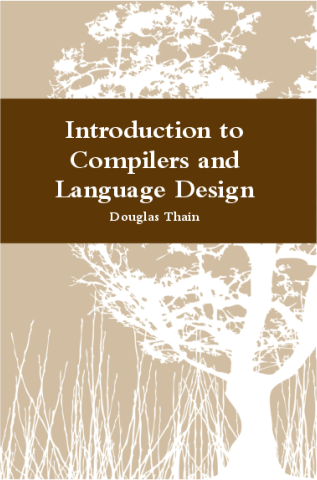
Compilers Book, First Edition

I am happy to announce that the first edition of "Introduction to Compilers and Language Design" is now available at http://compilerbook.org.  This is a free online textbook: you can access the PDFs directly, or order an inexpensive hardcover book.

Thank you to all the students who previewed this book and fixed typos and other errata.  Thanks especially to Andrew Litteken, who drafted and tested the chapter on ARM assembly.

Douglas Thain,
Introduction to Compilers and Language Design,
1st edition, 2018.
http://compilerbook.org
Hardcover ISBN: 978-0-359-13804-3


I first estimated the book would be finished in 2017, but it took another semester to finalize several chapters, while also teaching a different class!

Finally, I should mention that I was inspired by Andrea and Remzi Arpaci-Dusseau, who set a fine example by publishing Operating Systems in Three Easy Pieces as a free online textbook.


Monday, May 21, 2018

Graduation Address for Catholic Engineers

I had the pleasure of speaking at the commencement ceremony for the Department of Computer Science and Engineering at the University of Notre Dame in 2018.  Here is what I wrote:


Good afternoon!

It is a real pleasure to see all of these young men and women dressed up so nicely. As you may know, I spent a semester with all of the CSE students here as juniors in operating systems, compilers, and some other classes as well. It was rather early in the morning, and so as often as not, they were dressed in pajamas, flip-flops, and sometimes sweaty gym clothes. It is lovely to see everyone at their best.

I invite you all to just relax for a little while, look around you, and take in this moment. Reflect a bit on the path that led you here.

I'm sure that for most of you, it seems like you just arrived! Perhaps you took a long road trip to South Bend, and unloaded the car on a sweaty August afternoon. You met your roommate and probably wondered about their peculiar taste in music or food. You found your way around campus, met some interesting professors, did a lot of homework, and probably slept through a lecture once in a while. I'm sure every one of you has had moments of triumph, and some of tears as well. I hope that you made some lifelong friends, and maybe found romance along the way as well.

But of course, the reason that you came to Notre Dame was to struggle with the timeless questions that scholars have asked throughout the ages:
  • What is free will, and do humans really have it?
  • Are we redeemed by our faith, by works, or by the grace of God?
  • What is the meaning of "segmentation fault"?
  • Why does "git pull" default to merging instead of rebasing?
As pleasant as it is to look back upon the college years, I am here to tell you that this is not the end, but only the beginning. The world needs your talents, and you have a lot of important work ahead of you.

The modern world needs engineers, and our moment in time particularly needs Catholic engineers. To that end, I would like to offer a little reflection on the personal motto of Bishop Rhoades, which is "Veritatem in Caritate" or "Truth in Charity"  This is an excellent motto for an engineer to keep in mind.

Truth in Charity: You cannot speak the truth effectively unless you speak with charity. Likewise, it makes no sense to speak with charity if what you say is not the truth.

First, truth. Our society is currently undergoing a loss of confidence in the idea of truth itself. Senator Daniel Patrick Moynihan once said, "Everyone is entitled to their own opinion, but not their own facts." and this was often repeated as a sensible guideline for political debate. Today, we are finding it more and more difficult to agree on the basic facts of a situation. And there is no point debating our opinions without first having facts: What was the high temperature today? Which car is more fuel efficient? How many people in Indiana are unemployed?

The wonder of the Internet is that it has enabled everyone access to the world's knowledge, and allowed everyone to have a voice, which is empowering. But it has become harder for the average person to distinguish between trustworthy information and outright fabrications. I just took a look at the fact-checking site snopes.com, which felt it was necessary to debunk the myth that it is common for ostriches to go downhill skiing in Japan!

But an engineer deals with physical reality and knows that the truth exists, whether we like it or not. Nature cannot be cheated. A drone that runs out of battery will fall out of the sky. A program with a race condition will lock up. A circuit that draws too much power will catch fire. An engineer's job is to stand up for the truth -- however inconvenient it may be -- because they know that Nature will come to settle the account sooner or later.

Second, charity. It's no secret that our society is short on charity, which is a concern for the well-being of our neighbors. You all know the headlines about things like subprime mortgages, cheating on emissions tests, and the sale of personal data. In these and many more cases, clever people used their talents to benefit themselves while exacting a price not just against their immediate victims, but on society as a whole. Volkswagen might be able to pay back car owners who were defrauded, but there is nothing it can do to extract the excess pollution from the atmosphere.

As engineers, you will build the machines that make society operate. In the twentieth century, that meant things like locomotives and roads and bridges. In the twenty-first century, it includes search engines, voting machines, and self-driving cars. In every single one of these cases, yes, there is a customer to satisfy, but society at large a greater interest to be protected.

And so, as engineers, I charge you to speak the truth in charity:

Some of you may work on self-driving cars, which have the potential to reduce crashes and save time and money. But when a self-driving car has a flaw that threatens pedestrians, who will speak the truth in charity? You will!

Some of you may work on artificial intelligence, which enables us to find hidden patterns in massive datasets. But when a neural network perpetuates racism because of its poorly chosen training data, who will speak the truth in charity?  You will!

Some of you may work on systems for digital voting, which can make it easier for every citizen to participate in the political process. But when a voting system with a security flaw puts our democracy at risk, who will speak the truth in charity?  You will!

Now, perhaps that is all a bit heavy for this moment. It's a beautiful (rainy) spring day, you have worked hard to be here, and it's time to celebrate. So, let me instead give you one piece of advice that is more immediate. You can put it into use today!

It is all too easy to get attached to our phones, our computers, our gadgets, and get sucked into the endless chatter of status updates, news items, upvotes, comments, and so forth. These constant distractions can prevent us from having deeper experiences with other people, and draw us away from truth and charity.

Take time every day to turn off your gadgets. Enjoy a meal without looking at your phone. Spend an evening without the TV. Take a walk without looking at your watch. Trust me, your friends, your spouse, your children, and your parents will be much happier with your full attention. You can start at dinner with your family tonight: whoever picks up their phone first during dinner pays the bilk!

It has been a pleasure to have you here at Notre Dame.

Congratulations and good luck!

Don't forget to brush your teeth.

Monday, December 4, 2017

Build a Compiler for AlbaCore in Spring 2018

Profs. Brockman and Thain are currently recruiting multiple undergraduate students to participate in a spring project at the intersection of compilers and computer architecture.  The objective is to build a software toolchain (compiler, assembler, simulator, documentation, etc) that will allow programs written in C-minor to be compiled to the albaCore computer architecture.  This package will be used in future offerings of logic design to assist students in running real, complex programs on custom FPGA hardware.

Juniors or seniors who have taken either compilers or architecture (or both) are invited to apply by contacting either Prof. Thain (dthain@nd.edu) or Brockman (jbb@nd.edu).  The project will be offered as a three-credit undergraduate research class in Spring 2018.

Tuesday, June 27, 2017

Talk at ScienceCloud Workshop

Prof. Thain gave the opening talk, "Seamless Scientific Computing from Laptops to Clouds", at the ScienceCloud workshop preceding High Performance Distributed Computing 2017 in Washington, DC.  This talk gives an overview of the problem of migrating scientific codes from the comfortable environment of a laptop to the complex environment of a cluster or a cloud, highlighting our new tools for software deployment and resource management for bioinformatics and high energy physics applications.

Wednesday, May 31, 2017

Online Course in Data Intensive Scientific Computing

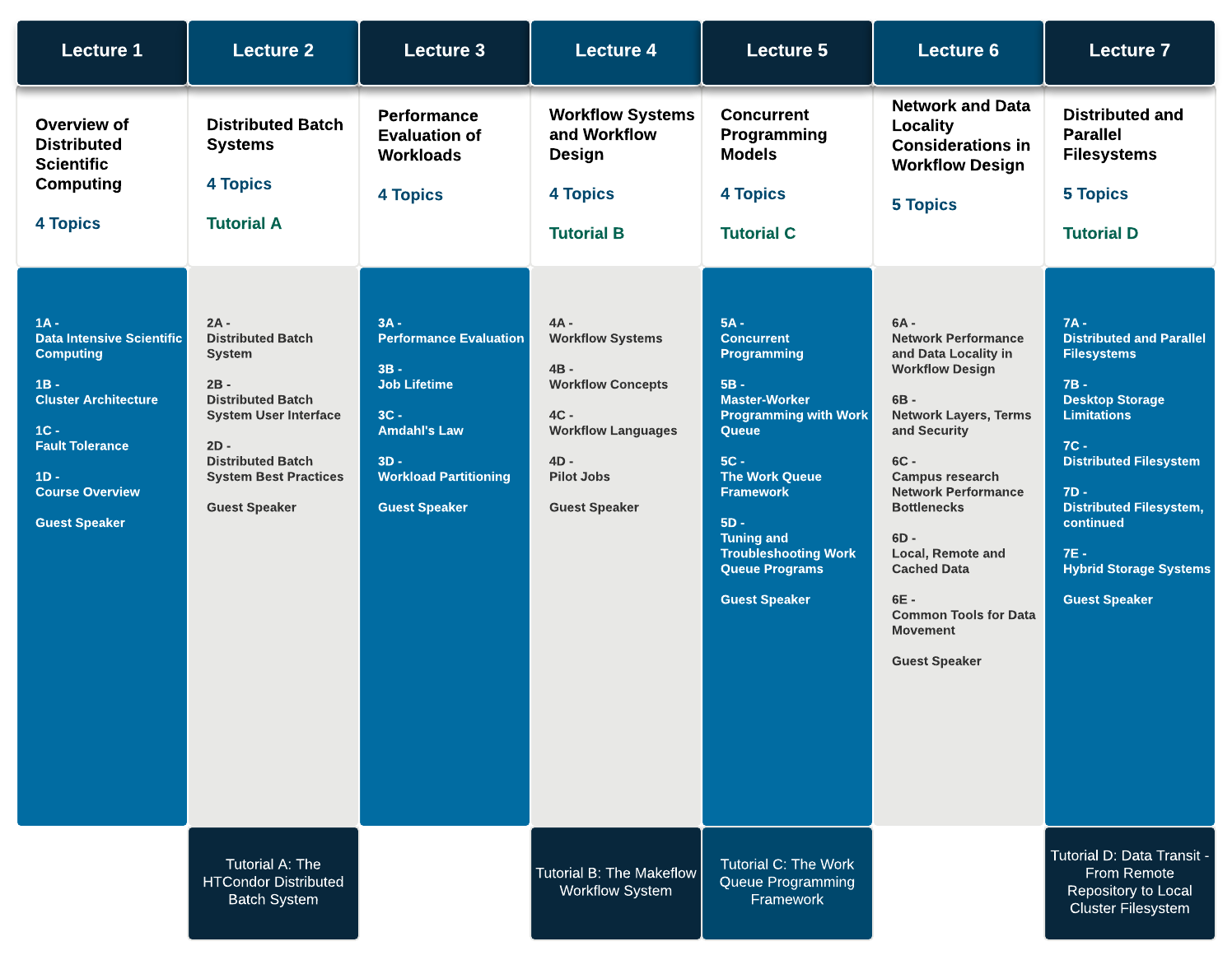
We are happy to announce the pilot of a new online short course in Data Intensive Scientific Computing.  This is the equivalent of a one-credit seminar which provides an introduction to the challenges of scientific computing at large scale and the tools used to address those problems.

The course was designed to augment our summer REU program in DISC, but is also suitable for undergraduate students taking research credits, and for graduating students in all disciplines looking for an introduction to topics and tools in scientific computing.

By default, the online course is ungraded: anyone is welcome to sign up, view the lectures, take the quizzes, and follow the tutorials.  If you want to receive a grade, talk to a faculty member at your institution to see if they will work with you on the material.

The course is developed by Prof. Douglas Thain and Prof. Paul Brenner, produced by the Office of Digital Learning at the University of Notre Dame, and offered through the EdX Edge platform.

You can check out a sample lecture here:


And here is an overview of the course structure:

Thursday, February 2, 2017

Writing a Compilers Textbook

To my surprise, I am in the final steps of writing a textbook!  You can see a sample chapter today at compilerbook.org.

The effort began in the fall of 2016, as I was putting together my materials for CSE 40243, our undergraduate class in Compilers and Language Design.  This class focuses on the challenges of engineering a working language: students implement a working compiler that translates a C-like language into X86 assembly.

While there are a variety of solid textbooks that are great for a graduate course in compiler theory and optimization, none quite had the flavor I was looking for.  Nearly every CS grad needs to write a parser, evaluator, or translator for some kind of little language in their career, but relatively few need to dig deeply into assembly language optimization.  So, I wanted to focus on language design choices and show that simple languages are not hard to implement.

I began to combine my handwritten chalkboard notes and some sample code into a LaTeX document, and the next thing you know, I have seven chapters written.  I expect to finalize everything in the spring 2017 semester.

What has made it relatively easy so far is that my compiler automatically generates many of the figures and code examples automatically, so relatively few things have to be drawn by hand.  For example, this sample AST is produced automatically by the compiler emitting Graphviz DOT code from the internal representation.  Neat, eh?


Following the example of Remzi and Andrea Arpaci-Dusseau with OSTEP the book will be made available for free online in PDF form, and also in an inexpensive hardcover edition printed on-demand.

Stay tuned for the release later in 2017...

Tuesday, April 5, 2016

NunyaOS: An Experimental OS Kernel

This semester, I am organizing an experimental class around the design of an operating system kernel.  Six students formed a team in response to a call for volunteers, and now busy designing NunyaOS, an experimental OS kernel.  Building on top of the Basekernel, they have built a system that boots an X86 machine, reads a CD-ROM filesystem, runs multiple processes in paged virtual memory, and has a simple windowing system.  We are off too a good start.

To try it out, download the source, build it, and run it in a VM like this:
qemu-system-i386 --cdrom basekernel.iso

The key organizing principle of NunyaOS is hierarchical containment.  This means that each process lives within a security container.  Within that container, the process has complete authority to manipulate its resources.  It also has the power to create sub-containers and then place child processes within them.  The containment can be applied to each of the resources within the system -- currently the filesystem, the window system, and the memory allocator.  As a result, each process lives a in a sort of a lightweight virtual machine, where it perceives itself to be the superuser.

For example, here are a few nested containers, each with their own filesystem root, display, and memory allocation:

Ideally, every child process will live in a container, so that we can eliminate attack vectors between code provided from different sources.  For example, your desktop should run your web browser in a container, your web browser should run each tab in a container, and each tab should run downloaded code (like a video codec) in yet another container.  In this way, untrusted code has very little leeway to affect other elements of your system.

Of course, this idea changes the customs by which processes interact with each other.  We can no longer build programs that scatter data all over the filesystem, and expect others to read it.  There are many challenges here, and we have only begun to dig into them.


Wednesday, September 16, 2015

Sandboxes, Distributed Computing, and Closures

The sandbox abstraction comes up over and over again in the context of distributed computing.  We didn't invent it, but it appears so frequently that it's worth giving it a name and explaining how it works.  This abstraction is our model of execution in the Makeflow workflow system, the Work Queue master-worker framework, the Umbrella environment generator, and other systems, and this is what enables these tools to interoperate.

The sandbox abstraction is a way of specifying a remote execution in a way that can be efficiently delivered and precisely reproduced.  To run a task, the user states the following:

run C = T( A, B ) in environment E

In this example, A and B are the input files to the task, T is the command to be run, and C is the output file produced.  (Obviously, there can be more input and output files as needed.)

The sandbox itself is a private namespace in which the task can run, isolated from the outside world.  This enables the task to perceive the input and output files in a different way than the called.  A sandbox can be implemented in many ways: the simplest is just a plain old directory, but it could a Linux container or even a whole virtual machine.

The environment E is all the additional data that needs to be present within the sandbox: the operating system, the filesystem tree, program binaries, scripts, etc, which are represented by L1, L2, and L3 above.  The environment must be compatible with the sandbox technology.  For example, a tarball is a sufficient environment for executing within a directory sandbox, while a virtual machine image is needed for a virtual machine sandbox. 

Now, the pieces must all come together:  The sandbox must be created and the environment unpacked within it.  The input files must be moved to the execution site and copied or otherwise connected to the sandbox.  The task is run, producing the output, which must then be moved outside of the sandbox to the desired location.  Then, the sandbox may be discarded.

Once you begin to execute all tasks using the sandbox abstraction, many things become easier.
  • Executing tasks at remote sites becomes very easy, because all of the necessary dependencies are explicit and can be moved around the world.  (e.g. Work Queue
  • Similar tasks running on the same machine can share input objects, to improve efficiency.  (e.g. Umbrella)
  • Multiple tasks can be chained together while respecting independent namespaces.  (e.g. Makeflow)
Of course, all of these properties are not accidental: they have a good precedent in the realm of language theory.  A sandbox execution is really just a closure, which is the name for a function combined with an environment, which is a set of bindings from names to values.

Wednesday, May 20, 2015

Writing Solid Tests is (Still) Hard

We have a nice little automatic build-and-test system for the Cooperative Computing Tools which has nicely brought together the capabilities of Github, Condor, and Docker.

Every proposed merge to the codebase is packaged up as a build job which is dispatched to our Condor pool.  Some of those jobs run natively on bare hardware, some jobs run on virtual machines, and some are running in Docker containers, but all of them are managed by Condor, so we can have a zillion builds going simultaneously without too much conflict.

The result is that anytime someone proposes a pull request, it gets run through the system and a few minutes later we get a new row on the web display that shows whether each platform built and tested correctly.  It's very handy, and provides for objective evaluation and gentle pressure on those who break the build.

(I should point out here that Patrick Donnelly and Ben Tovar have done a bang-up job of building the system, and undergraduate student Victor Hawley added the Docker component.)

Some days the board is all green, and some days it looks more like this:


But the hardest part of this seems to be writing the tests properly.  Each test is a little structured script that sets up an environment, runs some component of our software, and then evaluates the results.  It might start up a Chirp server and run some file transfers, or run Parrot on a tricky bit of Unix code, or run Makeflow on a little workflow to see if various options work correctly.

Unfortunately, there are many ways that the tests can fail without revealing a bug in the code! We recently added several platforms to the build, resulting in a large number of test failures.  Some of these were due to differences between Unix utilities like sh, dd, and sed on the various machines. Others were more subtle, resulting from race conditions in concurrent actions.  (For example, should you start a Master in the foreground and then a Worker in the background, or vice versa.)  There is a certain art to being able to write a shell script that is portable and robust.

There is also a tension in the complexity of the tests.  On one hand, you want short, focused tests that exercise individual features, so that they can be completed in a few minutes at give immediate feedback.

On the other hand, you also want to run big complex applications, so as to test the system at scale and under load.  We don't really know that a given release of Parrot works at scale until it has run on 10K cores for a week for a CMS physics workload.  If each core consumes 30W of power over 7 days, that's a 50 megawatt-hour test!  Yikes!

Better not run that one automatically.


Monday, May 19, 2014

Toward a Common Model of Highly Concurrent Programming

(This is the short version of a talk I gave at the MTAGS workshop at Supercomputing 2013.  See the slides here.)

Historically, highly concurrent programming has been closely associated with high performance computing.  Two programming models have been dominant: shared memory machines in which concurrency was expressed via multiple threads, and distributed memory machines in which concurrency was expressed via explicit message passing.  It is widely agreed that both of these programming models are very challenging, even for the veteran programmer.  In both cases, the programmer is directly responsible for designing the program from top to bottom and handling all of the issues of granularity, consistency, and locality necessary to achieve acceptable performance, with very little help from the runtime or operating systems.

However, a new approach to concurrent programming has been emerging over the last several years, in which the user programs in a much higher level language and relies upon the system to handle many of the challenging underlying details.  To achieve this, the program is successively decomposed into simpler representations, such that each layer of the system can gradually adapt it to the hardware available.

The layers can be described as follows:
  • declarative language (DL) for compactly representing a complete program.
  • directed graph (DAG) to represent the expanded program and its resources.
  • bag of independent tasks (BOT) with explicit input and output dependencies.
  • A shared-nothing cluster to which data and tasks must be assigned.
Several different research communities have arrived at this computing model somewhat independently: the high performance computing community, the scientific workflow community, and the cloud computing community.  In each case, the scale and complexity of the systems in use eventually made it impossible for the programmer or the user to take responsibility for all of the challenges of parallel/distributed computing.  Although each community employs different technologies and has distinct optimization goals, the overall structure of these systems is surprisingly similar.

A (very incomplete) selection of systems that follow this model:


Layer Cloud Stack Workflow Stack HPC Stack
Declarative Language (DL)    Pig Weaver Swift-T
Directed Acyclic Graph (DAG)Map-Reduce    Makeflow -
Bag of Tasks (BOT)JobTracker Work Queue Master Turbine
Distributed Data HDFS Work Queue Workers    MPI

Each layer of the system fulfills a distinct need.  The declarative language (DL) at the top is compact, expressive, and easy for end users, but is intractable to analyze in the general case because it may have a high order of complexity, possibly Turing-complete.  The DL can be used to generate a (large) directed acyclic graph (DAG) that represents every single task to be executed.  The DAG is not a great user-interface language, but it is much more suitable for a system to perform capacity management and optimization because it is a finite structure with discrete components.  A DAG executor then plays the graph, dispatching individual tasks as their dependencies are satisfied.  The BOT consists of all the tasks that are ready to run, and is then scheduled onto the underlying computer, using the data dependencies made available from the higher levels.

Why bother with this sort of model?  It allows us to compare the fundamental capabilities and expressiveness of different kinds of systems.  For example, in the realm of compilers, everyone knows that a proper compiler consists of a scanner, a parser, an optimizer, and a code generator.  Through these stages, the input program is transformed from a series of tokens to an abstract syntax tree, an intermediate representation, and eventually to assembly code.  Not every compiler uses all of these stages, much less the same code, but by using a common language, it is helpful to understand, compare, and design new systems.


Friday, February 14, 2014

Visualizing 10,000 Cores

Our Condor pool at the University of Notre Dame has been slowly growing, in no small part due to our collaboration with the Center for Research Computing, where it is now scavenging unused cycles from HPC clusters at the CRC.  When the dedicated batch system leaves a node unused, Condor is started on that node and keeps going until the dedicated system wants the node back.  Depending on the time of year, that leaves anywhere between 4K and 10K nodes available in the Condor pool.

We have tried a number of approaches at visualizing this complex system over the years.  Our latest tool, the Condor Matrix Display started as a summer project by Nick Jaeger, a student from the University of Wisconsin at Eau Claire.  The display shows a colored bar for each slot in the pool, where the width is proportional to the number of cores.

With a quick glance, you can see how many users are busy and whether they are running "thin" (1 core) or "fat" (many core) jobs.  Sorting by the machine name gives you sense of how each sub-cluster in the pool is used:


While sorting by users gives you a sense of what users are dominating the pool:


The display is always a nice way of viewing the relatively new feature of "dynamic slot" in Condor.  A large multi-core machine is now represented as a single slot with multiple resources.  For example, this bit of the display shows a cluster of 8-core machines where some of the machines are unclaimed (green), some are running 4-core jobs (blue), and some are running 1-core jobs (green):


Monday, February 6, 2012

Some Open Computer Science Problems in Workflow Systems

In the previous article, I extolled the virtues of Makeflow, which has been very effective at engaging new users and allowing them to express their workflows in a way that facilitates parallel and distributed computing. We can very consistently get new users going from one laptop to 100 cores in a distributed system very easily.

However, as we develop experience in scaling up workflows to thousands of cores across wide area distributed systems, a number of interesting computer science challenges have emerged. These problems are not specific to Makeflow, but can be found in most workflow systems:

Capacity Management
Just because a workflow expresses thousand-way concurrency doesn't mean that it is actually a good idea to run it on one thousand nodes! The cost of moving data to and from the execution nodes may outweigh the benefit of the added computational power. If one uses fewer nodes than the available parallelism, then it may be possible to pay the data movement cost once, and then exploit it multiple times. For most workflows, there is a "sweet spot" at which performance is significantly maximized. Of course, users don't want to discover this by experiment, they need some tool to recommend an appropriate size for the given workflow.

Software Engineering Tools
A workflow is just another kind of program: it has source code that must be managed, dependencies that must be gathered, and a history of modification to be tracked. In this sense, we are badly in need of tools for manipulating workflows in coherent ways. For example, we need a linker that can take a workflow, find all the dependent components, and gather them together in one package. We need a loader that can take an existing workflow, load it into a computing system, and then update file names and other links to accomodate it. We need a profiler that can report on the time spent across multiple runs of a workflow, so as to determine where problem spots may be.

Portability and Reproducibility
Makeflow itself enables portability across execution systems. For example, you can run your application on Condor or SGE without modification. However, that doesn't mean that your applications are actually portable. If one cluster runs Blue Beanie Linux 36.5 and another runs Green Sock Linux 82.7, your chances of the same executable running on both are close to zero. Likewise, if you run a workflow one day, then set it aside for a year, it's possible that your existing machine has been updated to the point where the old workflow no longer runs.

However, if we also explicitly state the execution environment in the workflow, then this can be used to provide applications with what they need to run. The environment might be as simple as a directory structure with the applications, or as complex as an entire virtual machine. Either way, the environment becomes data that must be managed and moved along with the workflow, which affects the performance and cost issues discussed above.

Composability
Everything in computing must be composable. That is, once you get one component working, the very next step is to hook it up to another so that it runs as a subcomponent. While we can technically hook up one Makeflow to another, this doesn't currently happen in a way that results in a coherent program. For example, the execution method and resource limits don't propagate from one makeflow to another. To truly enable large scale structures, we need a native method of connecting workflows together that connects not only the control flow, but the resource allocation, capacity management, and everything else discussed above.

Effortless Scalability

As a rule of thumb, I tell brand new users that running a Makeflow on 10 cores simultaneously is trivial, running on 100 cores is usually easy, and getting to 1000 cores will require some planning and debugging. Going over 1000 cores is possible (our largest system is running on 5000 cores) but requires a real investment of time by the user.

Why does scale make things harder? One reason is that computer systems are full of artificial limits that are not widely know or managed effectively. On a Unix-like system, a given process has a limited number of file descriptors per process and a limited number of files per directory. (Most people don't figure this out until they hit the limit, and then the work must be restructured to accomodate.) A complex network with translation devices may have a limited number of simultaneously network connections. A data structure that was small to ignore suddenly becomes unmanageable when there are 10,000 entries.

To have a software system that can scale to enormous size, you need to address these known technical issues, but also have methods of accomodating limits that you didn't expect. You also need an architecture that can scale naturally and observe its own limits to understand when they are reached. An ideal implementation would know its own limits and not require additional experts in order to scale up.

---

Each of these problems, though briefly described, are pretty hefty problems once you start digging into them. Some of them are large enough to earn a PhD. (In fact, some are already in progress!) They all have the common theme of making data intensive workflows manageable, useable, portable, and productive across a wide variety of computing systems.

More to follow.

Wednesday, February 1, 2012

Why Makeflow Works for New Users

In past articles, I have introduced Makeflow, which is a large scale workflow engine that we have created at Notre Dame.

Of course, Makeflow is certainly not the first or only workflow engine out there. But, Makeflow does have several unique properties that make it an interesting platform for bringing new people into the world of distributed computing. And, it is the right level of abstraction that allows us to address some fundamental computer science problems that result.

Briefly, Makeflow is a tool that lets the user express a large number of tasks by writing them down as a conventional makefile. You can see an example on our web page. A Makeflow can be just a few rules long, or it can consist of hundreds to thousands of tasks, like this EST pipeline workflow:

Once the workflow is written down, you can then run Makeflow in several different ways. You can run it entirely on your workstation, using multiple cores. You can ask Makeflow to send the jobs to your local Condor pool, PBS or SGE cluster, or other batch system. Or, you can start the (included) Work Queue system on a few machines that you happen to have handy, and Makeflow will run the jobs there.

Over the last few years, we have had very good experience getting new users to adopt Makeflow, ranging from highly sophisticated computational scientists all the way to college sophomores learning the first principles of distributed computing. There are a couple of reasons why this is so:
  • A simple and familiar language. Makefiles are already a well known and widely used way of expressing dependency and concurrency, so it is easy to explain. Unlike more elaborate languages, it is brief and easy to read and write by hand. A text-based language can be versioned and tracked by any existing source control method.
  • A neutral interface and a portable implementation. Nothing in a Makeflow references any particular batch system or distributed computing technology, so existing workflows can be easily moved between computing systems. If you I use Condor and you use SGE, there is nothing to prevent my workflow from running on your system.
  • The data needs are explicit. A subtle but significant difference between Make and Makeflow is that Makeflow treats your statement of file dependencies very seriously. That is, you must state exactly which files (or directories) that your computation depends upon. This is slightly inconvenient at first, but vastly improves the ability of Makeflow to create the right execution environment, verify a correct execution, and manage storage and network resources appropriately.
  • An easy on-ramp to large resources. We have gone to great lengths to make it absolutely trivial to run Makeflow on a single machine with no distributed infrastructure. Using the same framework, you can move to harnessing a few machines in your lab (with Work Queue) and then progressively scale up to enormous scale using clusters, clouds, and grids. We have users running on 5 cores, 5000 cores, and everything in between.
Of course, our objective is not simply to build software. Makeflow is a starting point for engaging our research collaborators, which allows us to explore some hard computer science problems related to workflows. In the next article, I will discuss some of those challenges.


Tuesday, November 16, 2010

The Virtualization Theorem Ignored for Three Decades

Today, in my graduate operating systems class, we discussed what I believe is the most important result in computer science ever to be persistently ignored:

Popek and Goldberg, Formal Requirements for Virtualizible Third Generation Architectures, Communications of the ACM, Volume 17, Issue 7, July 1974.

This paper puts forth a very simple principle that must be observed in order for a CPU to be capable of running in a virtual machine. First, two definitions:
  • A sensitive instruction reads or modifies supervisor state
  • A privileged instruction traps if attempted in user mode.
And this central theorem:
  • All sensitive operations must be privileged.
Here is why this is important. A conventional operating system (OS) is in charge of the whole machine, and is free to modify the processor status, page tables, I/O devices, and other sensitive aspects of the machine in order to run normal processes.

But, if you take that OS and put it in a virtual machine (VM), it is no longer in charge of the whole machine. All of those actions on sensitive state must be translated in some way by the virtual machine monitor. The simplest way to accomplish that translation is to run the OS in user mode, allowing the VMM to execute sensitive operations on its behalf. To make sure that the VMM gets all of the sensitive operations, they must all be forced to trap.

This principle was articulated very clearly in 1974, when virtualization was already a widely applied technique in the world of mainframe computing. Unfortunately, the principle didn't make the leap into the microcomputer world. In fact, there was an enduring tradition of releasing processors that were not virtualizable, only to realize the mistake and issue a second version with a minor fix.

For example, the venerable Motorola 68000 was first released in 1978, and was heralded as a "mainframe on a chip". Except, it had one little problem: a read from the sensitive status register did not trap, preventing the construction of a virtual memory system. So, Motorola issued the 68010, which was almost identical, except that a read from the status register forced a trap, enabling correct virtualization of memory.

Unfortunately, not everybody got the memo.

For nearly three decades, the Intel x86 series of processors did not have this property. In user mode, many instructions could be used to view sensitive state, and many attempts to write sensitive state would fail silently without a trap. From the 1970s until the late 1990s, efficient virtualization was basically impossible on the most widely used processor family.

Around the year 2000, virtualization became of interest as a way to service the multi-tenancy needs of large internet services. A number of solutions were developed simultaneously to work around the limitations of the Intel chips. One approach used in VMWare was to dynamically compile assembly code at runtime to convert sensitive instructions into deliberate traps to the VMM. Another approach used in the Xen hypervisor was to modify the operating system code so that it explicitly called the VMM instead of invoking sensitive instructions.

There are many other approaches to working around the limitation. Suffice to say that they are all rather complicated, but they can be made to work.

Finally, in 2005, both Intel and AMD introduced virtualization extensions to their processors, enabling basic trap-and-execute virtualization, only 29 years after the Popek and Goldberg theorem was widely circulated.

So, what's the moral of the story?

Monday, November 8, 2010

Sometimes It All Comes Together

Most days, software engineering involves compromises and imperfect solutions. It's rare for two pieces of software to mesh perfectly -- you always have to work to overcome the limitations or assumptions present in different modules. But, every once in a while, the pieces just come together in a satisfying way.

A few weeks back, we ran into a problem with BXGrid, our system for managing biometric data. Our users had just ingested a whole pile of new images and videos, and were browsing and validating the data. Because data was recently ingested, no thumbnails had been generated yet, so every screenful required a hundred or so thumbnails to be created from the high resolution images. Multiple that by each active user, and you have a web site stuck in the mud.

A better solution would be to generate all of the missing thumbnails offline in an orderly way. Since many of the transcoding operations are compute intensive, it makes sense to farm them out to a distributed system.

Peter Bui -- a graduate student in our group -- solved this problem elegantly by putting together almost all of our research software simultaneously. He used Weaver as the front-end language to query BXGrid and determine what thumbnails needed to be generated. Weaver generated a Makeflow to perform all of the transcodings. Makeflow used Work Queue to execute the tasks, with the Workers submitted to our campus Condor pool.

So far, so good. But, the missing piece was that Makeflow expects data to be available as ordinary files. At the time, this would have required that we copy several terabytes out of the archive onto the local disk, which wasn't practical. So, Peter wrote a module for Parrot which enabled access to BXGrid files under paths like /bxgrid/fileid/123. Then, while attached to Parrot, Makeflow could access the files, being none the wiser that they were actually located in a distributed system.

Put it all together, and you have this:

Sometimes, it all comes together.

Monday, November 1, 2010

Compiling Workflows with Weaver

Over the last year, our Makeflow system has become quite popular here at Notre Dame. Briefly, Makeflow takes a workload expressed in the plain old Make format, and executes it in a distributed system, using the dependency information to set up the appropriate remote execution environment. It does not require a distributed filesystem, so it's easy to get your applications going on hundreds to thousands of processors from the cloud or the grid. Makeflow is currently the back-end engine for our science portals in bioinformatics, biometrics, and molecular dynamics.

It didn't take long before our users started writing scripts in Perl or Python in order to generate Makeflows with tens of thousands of nodes. Those scripts all did similar things (query a database, break a dataset into N pieces) but also started to get unruly and difficult to debug. It wasn't easy to look at a script generator and determine what it was trying to accomplish.

Enter Weaver, which is the creation of Peter Bui, one of our graduate students. Weaver is a high level Python framework that, in a few simple lines, can generate enormous (optimized) Makeflows. Peter presented a paper about Weaver at the workshop on Challenges of Large Applications in Distributed Environments at HPDC earlier this year.

Consider this common biometrics workload: extract all of the blue irises from our repository, then convert each iris into a 'template' data type, then compare all of them to each other. Here is how you do it in Weaver:

b = SQLDataSet (’db’,’biometrics','irises')
nefs = Query(db,db.color='Blue')

conv = SimpleFunction('convertiristotemplate',outsuffix='bit')
bits = Map(conv,nefs)

cmp = SimpleFunction('compareiristemplates')
AllPairs(cmp,bits,bits,output='matrix.txt')

In the simplest case, Weaver just emits one gigantic Makeflow that performs all of the operations. However, sometimes there are patterns that can be executed more efficiently, given some better underlying tool. AllPairs is the perfect example of this optimization -- you can do an AllPairs using Makeflow, but it won't be as efficient as our native implementation. If the various data types line up appropriately, Weaver will simply call the All-Pairs abstraction. If not, it will expand the call into Makeflow in the appropriate way.

In principle, this is a lot like a C compiler: under certain conditions, the addition of two arrays can be accomplished with a vector add instruction, otherwise it must be expanded into a larger number of conventional instructions. So, we think of Weaver as a compiler for workflows: it chooses the best implementation available to execute a complex program, leaving the programmer to worry about the higher level objectives.

Wednesday, October 27, 2010

From Database to Filesystem and Back Again

Hoang Bui is leading the development of ROARS: a Rich Object Archival System, which is our generalization many of the ideas expressed in the Biometrics Research Grid. Hoang presented a paper on ROARS at the workshop on Data Intensive Distributed Computing earlier this year.

What makes ROARS particularly interesting is that it combines elements of both relational databases and file systems, and makes it possible to swap back and forth between both representations of the data.

A ROARS repository is an unordered collection of items. Each item consists of a binary file and metadata that describes the file. The metadata does not have a schema; you can attach whatever properties you like to an object. Here is an example item consisting of a iris image with five properties:

fileid = 356
subjectid = "S123"
color = "Blue"
camera = "Likon"
date = "23-Oct-2010"
type = "jpeg"


If you like to think in SQL, then you can query the system via SQL and you get back tabular data, as you might expect:

SELECT fileid, subjectid, color FROM irises WHERE color='Blue';

Of course, if you are going to actually process the files in some way, you need to put them into a filesystem where your scripts and tools can access them. For this, you use the EXPORT command, which will produce the files. EXPORT has a neat bit of syntax in which you can specify that the name of each file is generated from the metadata. For example this command:

EXPORT irises WHERE camera='Likon' AS color/subjectid.type

will dump out all of the matching files, put them into directories according to color, and name each file according to the subject and the file type. The example above would be named "Blue/S123.jpeg". (If the naming scheme doesn't result in unique filenames, then you need to adjust it to include something that is unique like fileid.)

Of course, if you are going to process a huge amount of data, then you don't actually want to copy all of it out to your local filesystem. Instead what you can do is create a "filesystem view" which is a directory tree containing pointers back to the objects in the repository. That has a very similar syntax:

VIEW irises WHERE camera='Likon' AS color/subjectid.type

Creating a filesystem view is much faster than exporting the actual data. Now, you can run your programs or scripts to iterate over the files. As they open up each file, the repository is accessed directly to open and read the necessary file data. (This is accomplished transparently by using Parrot to connect to the repository.)

The end result: a database that looks like a filesystem!

Monday, October 18, 2010

Summer REU: Toward Elastic Scientific Applications

In recent months, we have been working on the problem of building elastic parallel applications that can adapt to the available resources at run-time. Much has been written about elastic internet services, but scientific applications have a ways to catch up.

Traditional parallel applications are rigid: the user chooses how many nodes (or cores or CPUs) to use when the program starts. If more resources become available, or the application needs to grow, it is stuck. Even worse, if a node is lost due to a failure or a scheduling change, the program must be aborted. Rigid parallelism has been used for many years in dedicated clusters and supercomputers in the form of libraries such as MPI. It works fine for systems of tens or hundreds of nodes, but if you try to go bigger, it gets harder and harder to find a fully reliable system.

In contrast, an elastic parallel application can be modified at run-time to use greater or fewer resources as they become available, or if the size of the problem changes. Typically, an elastic application has one central coordinating node that tracks the progress of the program, and dispatches work units to other nodes. If new nodes are added to the system, the coordinator gives it some work to do. If a node fails or is removed, the coordinator makes a note of this, and sends the work to another node.

If you have an elastic application, then it becomes much easier to harness large scale computing systems such as clouds and grids. In fact, it becomes easier to harness any kind of computer, because you don't have to worry about them being reliable or even particularly fast. It's also useful in a traditional computing center, because you don't have to sit idle waiting for your ideal number of nodes to become free -- you can start work with whatever is available now.

The only problem is, most existing applications are rigidly parallel. Is it feasible to convert them into elastic applications?

We hosted two REU students to address this question: Anthony Canino, from SUNY-Binghamtom, and Zachary Musgrave, from Clemson University. Each took an existing rigid application and converted it into an elastic parallel application using our Work Queue framework. Work Queue has a simple C API, and makes use of a universal Worker executable that can be submitted to multiple remote systems. A Work Queue application looks like this:
Anthony worked on the problem of replica exchange, which is a technique for running molecular simulations in parallel at different energy levels, in order to achieve a more rapid exploration of the energy landscape. Our friends in the Laboratory for Computational Life Sciences down the hall have developed a molecular dynamics engine known as Protomol, and then implemented replica exchange using MPI. Anthony put Protomol and Work Queue together to create an implementation of replica exchange that can run on an arbitrary number of processors, and demonstrated it running on Condor and SGE simultaneously hundreds of nodes. What's even better is that the computation kernel was simply the sequential version of Protomol, so we avoided all of the software engineering headaches that would come with changing the base software.

Zachary worked with the genome annotation tool Maker, which is used to do things like finding protein sequences within an existing genome. Maker was already parallelized using Perl-MPI, so this required Zach to do some reverse engineering to get at the basic algorithm. However, it became clear that the MPI aspect was simply doling out work units to each node, with the additional optimization of work stealing. Zach added a Perl interface to Work Queue, and converted Maker into an elastic application running on hundreds of nodes. We are currently integrating Maker into Biocompute, our local bioinformatics portal.
Speaking of Biocompute, Notre Dame student Brian Kachmarck did a nice job this summer of re-working the user interface to the web site. Not only is it faster and more visually appealing, it also does a better job of presenting the Data-Action-Queue concept described in our recent paper about the system.


Monday, April 5, 2010

The Forty Tribes of Linux

As I have noted in this column before, a perennial challenge of distributed computing in the real world is dealing with the multiplicity of operating systems and related environments. If you are dealing with an uncontrolled environment like a large university or an 'at home' computing environment, there is no telling what you are going to get. If you have a piece of software that depends exactly on the presence of Linux 19.5.3.4.9.2, it just isn't going to work.

You might think that this could be avoided by having a professionally managed environment. At Notre Dame, we have a site license for Red Hat Linux, and our staff are pretty rigorous in keeping everything up to date and on track. But even then, you can't assume everything is identical: there is no way to upgrade everyone simultaneously, and every machine operates on a different schedule (and discipline) for picking up automatic updates. For example, we are currently in the tail of of a general campus migration from Red Hat 4 to Red Hat 5.

Here is some hard evidence. We recently started using the neat 'cron' feature in Condor to make a daily observation of the operating system version, kernel version, and C library version of each machine. With a few variations on condor_status, we can see the upgrade status of the whole system:

The major release numbers (below) aren't too bad. About 3/4 of our cores are running the latest Red Hat, but another 73 machines are behind by a version or two. And, oops, looks like someone plugged in their own personal CentOS machine. Not too hard to deal with, if you are careful to put 'redhat_version' in your requirements:


% condor_status -format "%s\n" redhat_version | sort | uniq -c | sort -rn

782 Red Hat Enterprise Linux Server release 5.4 (Tikanga)
27 Red Hat Enterprise Linux AS release 4 (Nahant Update 7)
26 Red Hat Enterprise Linux Server release 5.3 (Tikanga)
10 Red Hat Enterprise Linux AS release 4 (Nahant Update 8)
10 Red Hat Enterprise Linux WS release 4 (Nahant Update 7)
4 CentOS release 5.3 (Final)


If we go a little deeper, the picture gets murkier. Below are the distribution of Linux kernel versions. Interesting to note that a few are hand-modified for some unusual hardware, and only two are Xen virtualized. Hope that you don't have any code sensitive to the kernel version.


% condor_status -format "%s\n" kernel_version | sort | uniq -c | sort -rn

342 2.6.18-164.9.1.el5
294 2.6.18-164.el5
94 2.6.18-164.10.1.el5
32 2.6.18-164.11.1.el5
32 2.6.9-78.0.13.ELsmp
14 2.6.18-128.7.1.el5
12 2.6.18-164.6.1.el5
10 2.6.18-128.2.1.el5
6 2.6.18-164.2.1.el5
5 2.6.9-78.0.17.ELsmp
4 2.6.27.8-md-microway
4 2.6.9-89.0.20.ELsmp
2 2.6.18-128.4.1.el5
2 2.6.18-164.9.1.el5xen
2 2.6.9-78.0.5.ELsmp
2 2.6.9-89.0.16.ELsmp
2 2.6.9-89.0.9.ELsmp


For completeness, here is the distribution of glibc versions, which has much the same story:


% condor_status -format "%s\n" glibc_version | sort | uniq -c

452 glibc-2.5-42.el5_4.2
296 glibc-2.5-42
34 glibc-2.5-42.el5_4.3
24 glibc-2.3.4-2.41
16 glibc-2.5-34.el5_3.1
14 glibc-2.5-34
13 glibc-2.3.4-2.41.el4_7.1
6 glibc-2.3.4-2.43
4 glibc-2.3.4-2.43.el4_8.1


In the good old days, you could just indicate that a program required OpSys=="LINUX" and more or less expect it to run. That certainly isn't possible now. Perhaps we are misleading users by talking about this thing called Linux, which doesn't really exist in any consistent form. Instead, we should be telling our users that a new operating system gets invented every week, and is usually named after a team on Survivor.

The good folks at Sun tried to solve this problem almost 20 years ago with Java. The idea was that they would create a stable platform that could be implemented on any machine. Then, you could write programs that would be universally portable. The problem was, well...


% condor_status -format "%s " JavaVendor -format "%s\n" JavaVersion | sort | uniq -c | sort -rn
308 Sun Microsystems Inc. 1.6.0
222 Sun Microsystems Inc. 1.6.0_15
174 Sun Microsystems Inc. 1.6.0_17
52 Free Software Foundation, Inc. 1.4.2
28 Sun Microsystems Inc. 1.6.0_18
3 Sun Microsystems Inc. 1.5.0_17
2 Apple Computer, Inc. 1.5.0_19


Many people think the grand solution to this problem is virtual machines. Perhaps, but more on that next time.